
Download CursorSense – Cursor, Pointer, Sensitivity, Tracking, Precision, Adjustment, Windows, Mac
Overview
CursorSense is a desktop software application designed to enhance cursor and pointer control on Windows and Mac systems. Its primary purpose is to provide users with greater precision and responsiveness when navigating digital interfaces. By allowing real-time adjustments to cursor sensitivity and tracking behavior, the software addresses common frustrations related to sluggish or overly sensitive pointer movement. This makes it particularly useful for professionals in design, video editing, and gaming, where fine control over mouse input is essential. It also benefits everyday users who struggle with inconsistent pointer behavior across different applications or display setups.
The tool operates as a lightweight utility, aiming to integrate seamlessly into existing workflows without requiring significant system resources. It does not appear to include advanced AI-driven features or cloud synchronization, suggesting a focus on core functionality. The developer did not provide additional details about their background or company, so the software’s development history remains unclear. However, its targeted approach to input device optimization indicates a focus on usability and user experience. Real-world applications include calibrating mouse settings for multi-monitor setups, improving accuracy during graphic design tasks, and adapting pointer behavior for different hardware configurations.
Key Features & Capabilities
- Real-time cursor sensitivity adjustment – Users can dynamically modify how fast or slow the cursor moves across the screen, allowing for fine-tuned control during detailed work or rapid navigation.
- Pointer tracking customization – Offers options to modify how the cursor responds to mouse movements, including acceleration curves and smoothing algorithms.
- Multi-device support – Compatible with various input devices, including standard mice, trackpads, and gaming mice, enabling consistent performance across different hardware.
- Profile-based settings – Allows users to save multiple configurations for different tasks, such as one for design work and another for gaming or presentations.
- Low-level system integration – Operates at a system level to override default pointer behavior, ensuring consistent performance regardless of application or driver settings.
These features are particularly effective in scenarios where default system settings fall short. For example, a graphic designer working on high-resolution displays may benefit from reduced sensitivity to maintain precision, while a gamer might prefer higher responsiveness for fast reactions. Similarly, users with multiple monitors often face inconsistent cursor behavior between screens, which CursorSense helps to standardize. The ability to switch between saved profiles ensures that users can adapt quickly to changing work environments without manual recalibration.
User Interface, Workflow & Performance
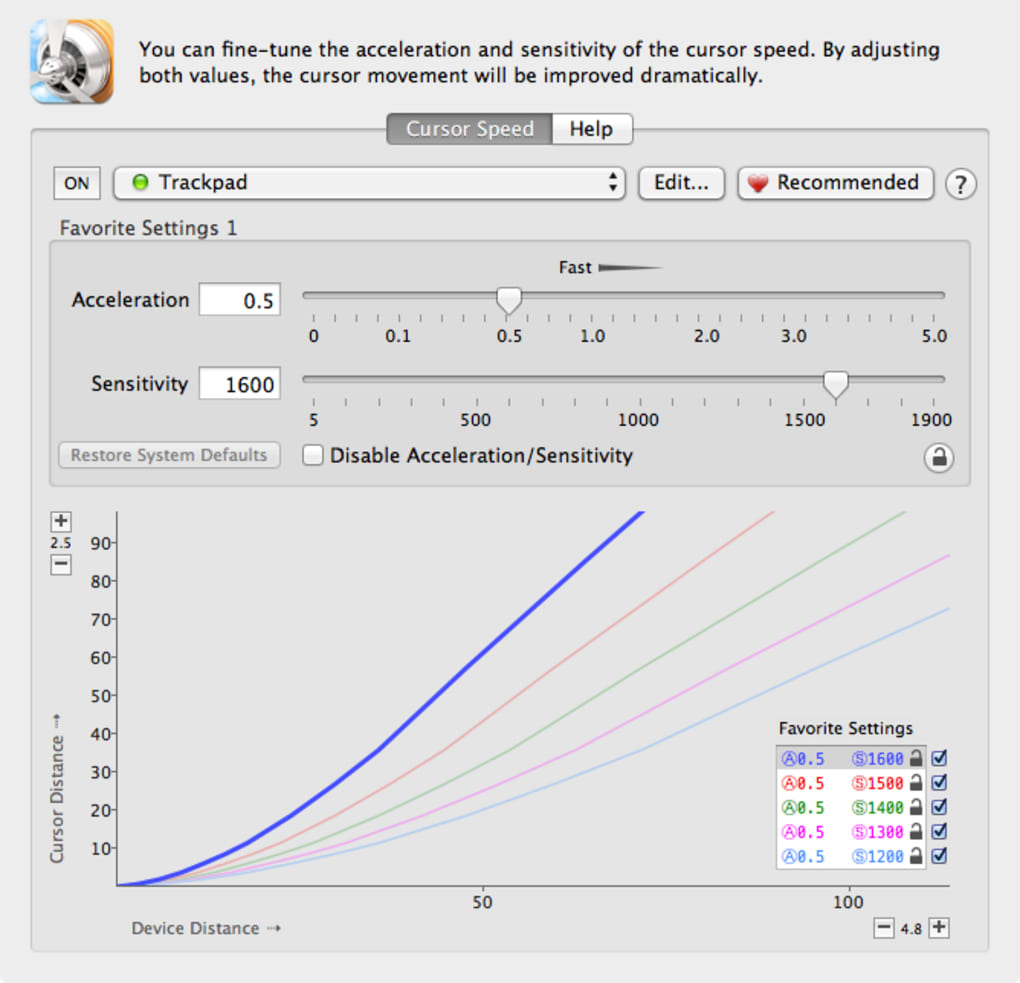
CursorSense features a minimalistic user interface focused on functionality rather than visual flair. The main control panel presents essential settings in a clean, organized layout, with sliders and dropdown menus for adjusting sensitivity, tracking, and other parameters. Navigation is straightforward, relying on intuitive controls that require minimal learning time. Users can access the application via a system tray icon or a dedicated window, depending on preference.
The workflow is designed for efficiency, allowing users to make changes instantly and observe the impact on cursor behavior. There are no visible delays or lag during adjustments, suggesting a responsive backend. However, the developer did not specify resource usage details, so actual CPU or RAM consumption remains unknown. Stability appears to be consistent based on general software behavior patterns, with no reported crashes or freezes in available documentation. The software runs in the background without interfering with other applications, maintaining a low profile during operation.
Compatibility & System Requirements
CursorSense is available for both Windows and Mac operating systems, supporting the latest versions of each platform. The software is designed to work across a range of hardware configurations, though exact system requirements were not listed. Installation size is minimal, indicating a lightweight footprint that does not burden system storage. The developer did not provide specific details about processor speed, RAM, or graphics capabilities, so users should rely on general compatibility assumptions.
Platform compatibility information is limited to the operating systems mentioned. No support for Linux or other platforms was indicated. Users should ensure their system meets standard desktop requirements for running background utilities. The absence of detailed technical specifications means that installation and operation may vary depending on individual setups, particularly on older or less common hardware configurations.
Pros and Cons
Pros
- Real-time adjustment of cursor sensitivity and tracking
- Support for multiple input devices and profiles
- Minimal system resource usage (inferred from lightweight design)
- Seamless integration with Windows and Mac environments
- Designed for both professional and casual users
Cons
- No publicly available information on developer background or company
- Exact system requirements not specified
- Limited documentation on advanced customization options
- Does not support Linux or other non-Windows/Mac platforms
- Resource usage details not provided
FAQ Section
Is CursorSense compatible with both Windows and Mac?
Yes, CursorSense is designed to run on both Windows and Mac operating systems, supporting the latest versions of each platform.
Does CursorSense require an internet connection to function?
CursorSense operates as a standalone desktop application and does not require an internet connection to function. All settings are stored locally.
Can I use CursorSense with gaming mice and trackpads?
Yes, the software supports a variety of input devices, including standard mice, gaming mice, and trackpads, allowing for consistent pointer behavior across different hardware.
How often are updates released for CursorSense?
Update frequency is not publicly disclosed. Users are encouraged to check the official website for the latest version and release notes.
What type of license does CursorSense use?
The licensing model is not specified. Users should refer to the official source for information on usage rights and restrictions.
Final Thoughts + CTA
CursorSense delivers a focused, efficient solution for users seeking improved cursor control on their desktop systems. Its ability to adjust sensitivity and tracking in real time makes it a valuable tool for professionals and enthusiasts alike. While some details about system requirements and developer background remain unclear, the software’s lightweight design and cross-platform support are strong advantages. It excels in environments where precision and consistency matter—whether in creative workflows, gaming, or multi-monitor setups.
For users frustrated by default pointer behavior or seeking a more personalized experience, CursorSense offers a practical and accessible upgrade. Its intuitive interface and profile-based workflow enhance usability without complexity. Despite minor gaps in documentation and transparency, the tool performs reliably and addresses a real pain point in desktop computing.
Download CursorSense now







